
djangsters
professional software developers

A penetration test (or pen test) is a security exercise where a cybersecurity expert attempts to find and exploit vulnerabilities in a system. The goal is to simulate real-world attacks and identify any weak points before hackers do.
You’ll often hear another term used alongside ‘pen test’: vulnerability scan.
The distinction matters.
Think of it this way:
A large portion of cybercrime is not targeted; it's opportunistic. Attackers run vulnerability scans on thousands of sites and exploit any vulnerabilities they find. If your system has a known vulnerability, it's only a matter of time before someone finds it and exploits it. Your best defense is to beat them to the punch and plug the holes.
Most penetration test reports are structured around common vulnerability frameworks such as the OWASP Top 10. The OWASP Top 10 lists the most common web application risks, including:
So while it makes it easier for you to fix vulnerabilities, it also doubles as a shopping list for attackers. If your report references OWASP findings, it simply means your application contains one or more well-known vulnerability types.
You commissioned a test. The report comes back. It lists a number of Critical security vulnerabilities in your web application. What now?
First, take a deep breath; it's not as bad as it sounds. A failed pen test can be stressful, but remember, it's not a breach. Penetration tests are diagnostic, not catastrophic.
The goal of a penetration test is to find vulnerabilities, so if your report has findings, the test worked. The report is showing you where you might have problems, not where you’ve already been compromised.
Also, not everything labeled as critical is actually critical.
Most reports will classify findings as critical, high, medium, low, and informational. This is a useful starting point, but not the full picture.
Severity reflects technical risk, not business impact. And those are not always the same thing.
For example:
Context Matters.
I know it's tempting to just fix problems so you can pass the pen test, but that’s the wrong goal. Passing the test is not the goal in itself; having a secure system is. To do that, you need to prioritize by business impact.
Ask yourself:
No penetration tester understands your system as deeply as your development team. That context is essential.
In an ideal world, you would fix all the errors all at once, but in reality, you need to prioritize. A good idea is to use the Eisenhower Matrix. The Eisenhower Matrix helps prioritize tasks based on urgency and importance. For you, this might look like:
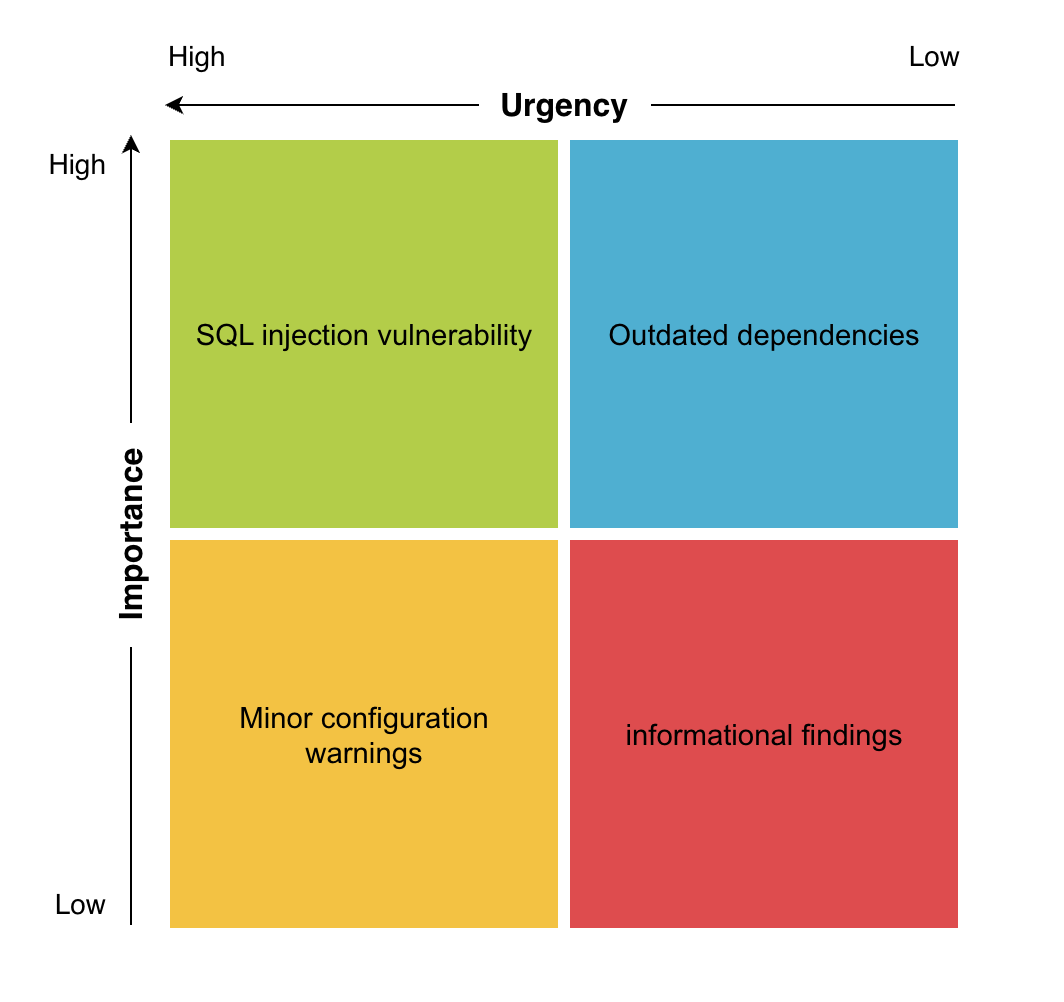
Once you have your priorities, start with true critical vulnerabilities. They pose the most immediate threat. Examples of truly critical vulnerabilities:
These are vulnerabilities that can lead to data compromise or system takeover. In other words, they are immediately exploitable and can compromise business. In our previous example, that one vulnerability that allows a hacker to access your customer database? Yeah, start with that.
In simple terms, put out the fire before repainting the walls.
What you do next is up to you, but we wouldn’t jump straight into the next “high” tasks. Instead, target security quick wins. Quick wins could be as simple as updating dependencies or making small refactors. For example, for you these could be:
Why?
For us, reducing the total number of vulnerabilities quickly matters more than tackling them one by one.
Security fixes should follow the same discipline as normal development.
This is especially important when fixing authentication or database-related vulnerabilities. Be prepared to get your hands dirty, or hire someone who can help you do it if you are not a security expert or developer.
You've made changes, thoroughly tested, now what? Well, you are most of the way there. Now you need to formally validate your work.
Some findings require architectural or framework-level changes. For example, in Django applications, common penetration test findings include things like:
Django provides strong built-in protections, but only if configured correctly. If you have an experienced Django development team, they can usually address these issues internally. But many companies running successful web applications don’t have a dedicated engineering or security team. Sometimes the original developers have moved on, or the application is maintained by a small product team.
At djangsters, we help teams move from failed penetration tests to secure applications. We can assist with:
Whether the fix is simple or architectural, having experienced guidance can significantly reduce the time to a solution. If you’ve recently received a report listing critical security vulnerabilities in your web application, feel free to reach out. We’re happy to review the findings and help you build a clear remediation plan.
We've said this before, but security is an ongoing practice, not a one-time event. Passing a pen test today does not guarantee you'll pass one tomorrow. You need to keep up with it to avoid failing the next security audit. Keep your application up to date, and occasionally run vulnerability scans, and if something pops up, fix it. If this sounds like whack-a-mole, then congratulations, you are starting to understand why security is such a big topic.
The goal isn’t just to pass tests, it’s to reach a point where passing them is routine, not stressful.
djangsters GmbH
Vogelsanger Straße 187
50825 Köln
Social Media

